QuickTools Pro
The biggest QuickTools yet. Version 4.3 folds Master Paralax, Master Box, Joysticks 'n Sliders, UI Grids and Master Grid into one panel, adds a Color Palette and two-column layouts, and builds in FX Search with Align, Graph, Paste Image and Still Frames.
Get on Gumroad — Free free · regular updates $0 one-time 10 tool tabs FX ⌕ search built in LIVE DEMO APP VERSION 4.3 REQUIRES After Effects 2021+ HOST After Effects TYPE .zxp PRICE $0 one-timeFive tools moved in. One panel to dock.
4.3 is a free update that installs over 4.2 — same panel, same shortcuts, a lot more inside. Click the tabs of the live panel above to try them.
4 TOOLS · ONE PANELParalax, Master Box, Joysticks, UI Grids
Four standalone tools became tabs of QuickTools Pro, with 57 new commands you can run from FX Search. Each one runs isolated, so the standalone versions can stay installed.
MASTER GRIDGrids from your own layers
Lay existing layers out as rectangular, radial, path or sphere grids, drive them from a control null, add Proximity effectors and save grid presets.
COLOR PALETTEYour colours, one click away
Click a swatch to fill the selected shapes, text or layers. Import Adobe .ase files, extract a palette from an image, export .ase or a PNG swatch sheet.
TWO COLUMNSLay the panel out your way
Drop a tab on the panel’s left or right edge to open a second column. Both columns shrink together to fit the dock, and the search bar spans them.
EFFECTORSeveral controllers + Loop motion
Stack more than one controller on the same layers — positions add up, scales multiply — and tick Loop motion for a wave that travels out from the controller.
COMP SETTINGChange only what you mean to
Pick Size, Frame Rate and / or Duration, and apply to the active comp, all precomps, the selected layers’ sources or the comps selected in the Project panel.
FX SEARCHAlign, Graph, Paste Image, Still Frames
Align and distribute layers, ease keyframes with 25 templates, paste a clipboard image as a layer, and grab comp frames into a gallery — plus ★ recents and search by initials.
RELIABILITYCalm when After Effects is busy
Heavy projects and plugins no longer trigger false errors, duplicate obsolete effects are hidden, and the XC logo opens a guide, a command reference and a feedback form.
Ten tabs, one panel.
Everything docks into a single side panel: drag tabs into groups or a second column, and use the search box on top to jump to any tool by name.
01FX Search
A global, Spotlight-style palette for After Effects plus a search box on top of the panel — effects, presets, scripts, extensions and every QuickTools command by name or initials.
02Quick Tools
The core tray: Path tools, Merge / Split, Rename, Expression, Offset, Un-Precomp, Master PreComp, Dup-Comp, Text Tool, Effector, Ani-Marker, Randomize, Comp Setting and Arrange Project.
03Set Anchor / Null
Set anchor points and spin up null controls in a click, with a 9-point grid and flexible placement methods.
04Graph Tools
A full easing kit — ease in/out, linear, hold, auto & continuous bezier, plus bounce, overshoot and copy/paste ease between keyframes.
05Quick Ani
Rig a layer in one click, then shape the motion from 50 IN / MID / OUT controls — or drop a saved preset on it. Ten built-ins included, and your own save out as .qap packs.
06Palette · new
A colour library shared by every After Effects on the machine: click to fill, Shift-click to stroke, grab colours from the selection, build a Color Controls null, import / export .ase, or pull 2–16 colours out of any image.
07Paralax · new
Master Paralax’s one-click 2.5D parallax rig, now a tab of QuickTools Pro.
08Master Box · new
Master Box’s text-box and stitch tools, with presets that are now saved between sessions.
09Joy & Sliders · new
Joysticks ’n Sliders as a tab: create joysticks, sliders and templates without the blocking AE dialogs.
10UI Grids · new
Responsive UI grids and guides, sharing presets with the standalone UI Grids.
11Master Grid · new
Build a grid from the layers you already have, drive it from one control null and add Proximity — 17 commands, all reachable from FX Search.
12Layout
Drag tabs into groups, or to the left / right edge for a second column. Two columns scale together to fit the panel, and the theme colour is yours to pick.
Find anything. One keystroke.
FX Search is a Spotlight-style command palette built into the panel. Press the global hotkey anywhere inside After Effects and a small, borderless bar appears right at your cursor — type a few letters (or just the initials: “dmc” finds Dropdown Menu Control) and it instantly finds matching effects, animation presets, scripts, ScriptUI panels, extensions and every QuickTools command across your whole setup.
Pick a result, press Enter, and it's applied to your selected layer — then the window hides itself so you never lose focus on your comp. New in 4.3: Align and Graph panels that stay open while you click, Paste Image, an FX Console–style Still Frames gallery, a ★ recent list and a built-in guide. Try it right here:
FX SEARCH AE · LIVE Try↑↓ to move · Enter applies or runs it · Shift+Enter is the Shift-click of a Quick Tool · Esc backs out. The bar's icons work too: ★ recent commands, the camera captures a still of the comp, the picture opens Still Frames, the sliders open Settings, the XC logo the guide. Deselect the layers to get the real Select a layer first warning.
This is the actual FX Search window of QuickTools Pro 4.3, on a simulated After Effects project with a sample of effects, presets, scripts and every QuickTools command.
Searches your whole setup
Effects Every effect installed in After Effects Animation Presets Your saved .ffx presets Scripts & ScriptUI Panels Launch any of them by name Extensions Other CEP panels you have installed Quick Tools Fire any QuickTools Pro button by name — Quick Ani, Split Text and every tab included Tools Align, Graph, Paste Image, Still Frames, Help & FeedbackKeyboard
Enter Apply / run the result, then hide ⇧ Enter Shift variant of a Quick Tool ↑ ↓ Move through results ★ Show your recent commands the moment it opens Esc Clear the search text Esc Esc Hide the windowGlobal hotkey
Windows Ctrl + Alt + Space macOS Ctrl + Option + Space Rescue Ctrl + Alt + Shift + F12Hotkey already taken? Open with the rescue combo, then reassign it from the gear icon — it applies within a second, no restart.
Every pop-up tool, up close.
Pick a tool, then hover the preview to see it in action.
Path Tools
Select Path, Control Path with a null, and Motion Path to drive layers along a path — grouped in one dropdown.
Path Tools HOVER TO PREVIEW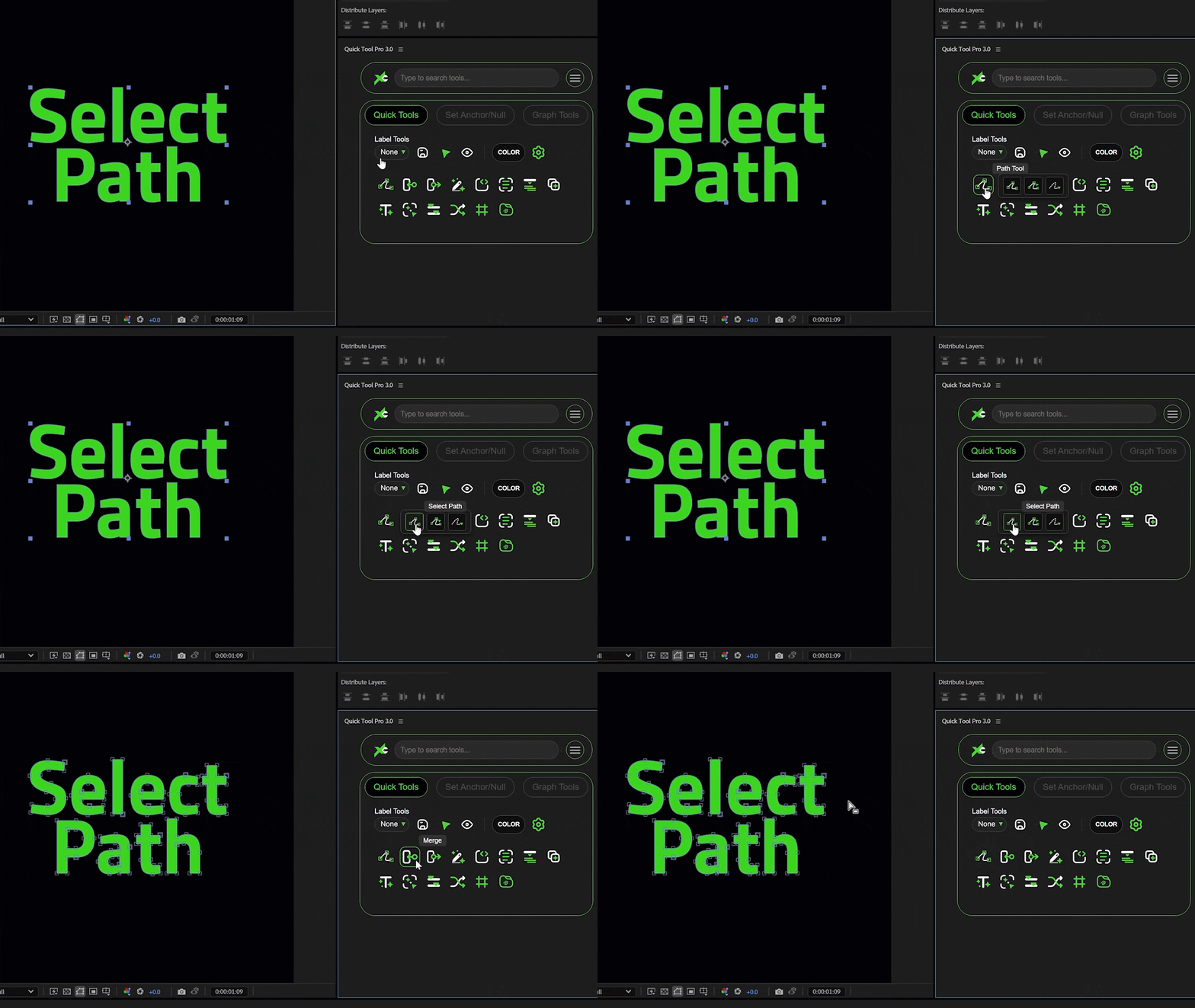
The full kit: a panel with ten tabs — Quick Tools, Set Anchor / Null, Graph Tools, Quick Ani, Palette, Paralax, Master Box, Joysticks ’n Sliders, UI Grids and Master Grid — plus the built-in FX Search with its Align, Graph, Paste Image and Still Frames tools.
The whole kit, one click away.
Add QuickTools Pro to your After Effects workflow — free, with regular updates.
Get on Gumroad — Free ↗Frequently asked questions
- What is included in QuickTools Pro?
- The full kit: a panel with ten tabs — Quick Tools, Set Anchor / Null, Graph Tools, Quick Ani, Palette, Paralax, Master Box, Joysticks ’n Sliders, UI Grids and Master Grid — plus the built-in FX Search with its Align, Graph, Paste Image and Still Frames tools.
- What’s new in 4.3?
- Master Paralax, Master Box, Joysticks ’n Sliders, UI Grids and Master Grid moved into the panel as tabs, alongside a new Color Palette, two-column layouts, a Comp Setting that changes only what you tick, Effector stacking with Loop motion, and an FX Search that can align, ease, paste images and capture still frames.
- I already have Master Box / Paralax / UI Grids installed. Do I need to remove them?
- No. Each tool inside QuickTools Pro runs isolated from the standalone version, so both can stay installed; removing the standalone ones only tidies the Window menu. If the old standalone FX Search for After Effects is still installed, remove it — FX Search is built into QuickTools Pro and the two would compete for the same hotkey.
- How do I install it?
- It installs entirely from the signed .zxp — no manual file copying. Use a free ZXP installer (ZXP Installer from aescripts.com, or Anastasiy’s Extension Manager): quit After Effects, drag the .zxp onto the installer, then relaunch and open it from the Window menu. The package is self-signed, so allow the “unknown publisher” prompt — that’s expected.
- Which After Effects versions are supported?
- After Effects 2021 (18.0) or newer, on Windows 10 / 11 (64-bit) and macOS. It installs as a standard extension (.zxp). On Windows the FX Search window needs the Microsoft Edge WebView2 Runtime, which Windows 11 already has; the installer’s Check PC script tells you if it is missing.
- What does the built-in FX Search do?
- Press Ctrl+Alt+Space (Ctrl+Option+Space on Mac) anywhere in After Effects and a small search bar appears at your cursor. It finds effects, presets, scripts, panels, extensions and every QuickTools command — by name or by initials — and also opens the Align and Graph panels, Paste Image and the Still Frames gallery. The search box on top of the panel does the same for the panel’s own tools.
- What is Quick Ani?
- A one-click animation rig. Select a layer, press Apply, and it adds an OBJECT animation effect with 50 IN / MID / OUT controls plus the expressions that drive them — position, scale, rotation, opacity, skew, flicker and more. Ten presets ship with it, you can save your own, and preset packs export as .qap files you can back up or hand to someone else.
- Do I get updates?
- Yes. Updates ship through Gumroad, and you can re-download the latest build any time from your library.